All India Radio recorded in London, UK on August 5, 2019 at 1759 UTC on the frequency of 9445 kHz using SDR#, AirSpy Mini, SpyVerter and DX Engineering NCC-1 phaser connected to two Wellbrook ALA1530S+ antennas (positioned indoors) to mitigate severe local man-made interference. The transmitter has a power rating of 250 kW and is located in Bengaluru, India. The news bulletin mentions the presidential order under Article 370 relating to Jammu and Kashmir, issued on the day of the broadcast.
Showing posts with label SDR#. Show all posts
Radio Thailand's English service recorded in London, UK on August 2, 2019 at 1900 UTC on the frequency of 9920 kHz using SDR#, AirSpy Mini, SpyVerter and DX Engineering NCC-1 phaser connected to two Wellbrook ALA1530S+ antennas (positioned indoors) to mitigate severe local man-made interference. The transmitter has a power rating of 250 kW and is located in Udon Thani, Thailand.
Channel Africa recorded outdoors in London, UK on July 31, 2018 at 1700 UTC, on the frequency of 11885 kHz using GPDWin, AirSpy R2, SpyVerter 2, Bonito GI300 isolator and Bonito MA305 active antenna. The transmitter is located in Meyerton, South Africa. This transmission had a power rating of 500 kW and was directed towards Central and West Africa. The recording contains a news bulletin discussing contested election results in Zimbabwe and Mali.
Radio Japan in English recorded in London, UK on July 26, 2018 at 0500 UTC, on the frequency of 9860 kHz using, SDR#, AirSpy Mini, SpyVerter and DX Engineering NCC-1 phaser connected to two Wellbrook ALA1530S+ antennas (positioned indoors) to mitigate severe local man-made interference. The transmitter is located in Santa Maria di Galeria, Italy. This transmission had a power rating of 250 kW and was directed towards West Africa.
The recording contains the news bulletin announcing the execution of the six members of a Japanese doomsday cult, Aum Shinrikyo (including its leader, Shoko Asahara -- real name Chizuo Matsumoto), who were held responsible for the deaths of dozens of people.
Readers of this blog may already know that I live in a densely built-up part of London, which is a very harsh environment for listening to shortwave radio indoors. I have come up with some RFI mitigation strategies, but these work best when the underlying radio signals are still relatively strong. That is because once a signal dips below the ambient noise floor there isn't much one can do to recover it.
At home, I enjoy listening to "blowtorch" signals like All India Radio, Voice Of Greece and Voice of Turkey (although occasionally I try my luck and listen to weaker stations). Still, sometimes the propagation is poor and even these stronger transmissions start fading into the noise. This can be especially disappointing when I start recording a particular transmission and then go off to do other things, only to find out later that the recording is heavily ridden with static. Many of my night-time recordings have ended up this way and until recently I thought that they were generally beyond "repair".
Enter SDR#. It turns out that it can process a regular audio WAV file just as if it were a real-time radio signal, meaning that its noise reduction plugins can be used to clean up the sound.
![]() |
| SDR# settings for denoising audio. Click the image to enlarge. |
To do this, open the WAV recording either as an IQ file or using the FilePlayer front-end plugin. Chose the RAW demodulation mode and click play. You can then experiment with IF Noise Reduction parameters to find a setting that offers a good tradeoff between the noise filter strength and the amount of audio artefacts.
To give an example, here's a rather noisy recording of All India Radio I grabbed last New Year's Eve:
And here it is after noise reduction with SDR#:
Although there are a few DSP audio artefacts in the denoised version, I do like the end result and I'm sure I will be repairing quite a few more of my noisy recording this way.
With tensions flaring up on the Korean peninsula once again, here are some Korean broadcasts I have extracted from my recent spectrum recordings:
KBS World Radio (English): April 6, 2016
KBS World Radio recorded in London, UK on April 6, 2016 at 1559 UTC, on the frequency of 9515 kHz using AirSpy, SpyVerter, SDR# software and a 2 x 6m long wire dipole antenna. The transmitter has a power rating of 250 kW and is located in Kimjae, South Korea. In the news: a possible new nuclear test planned by DPRK, as suspected by South Korean intelligence services, GPS jamming by North Korea.
Click here to download the recording // Link to the original SRAA submission
Voice of Korea: April 9, 2016
Voice of Korea, DPRK recorded in London, UK on April 9, 2016 at 1638 UTC, on the frequency of 11645 kHz using AirSpy, SpyVerter, SDR# software and a 2 x 6m long wire dipole antenna. SDR#'s IF noise reduction plugin was used to mitigate the severe levels of static arising from poor propagation conditions. The transmitter has a power rating of 200 kW and is located in Kujang, DPRK. In the news: North Korea's testing of a new intercontinental ballistic missile component, the ability to mount nuclear warheads on such missiles.
Click here to download the recording // Link to the original SRAA submission
KCBS Pyongyang: April 9, 2016
Korean Central Broadcasting Station, Pyongyang recorded in London, UK on April 9, 2016 at 1601 UTC, on the frequency of 11680 kHz using AirSpy, SpyVerter, SDR# software and a 2 x 6m long wire dipole antenna. SDR#'s IF noise reduction plugin was used to mitigate the severe levels of static arising from poor propagation conditions. The non-directional transmitter has a power rating of 50 kW and is located in Kanggye, DPRK. This is a domestic service targeted at North Korea's local population. Soothing North Korean music is being broadcast, presumably to put the listeners at ease after the incendiary war-time rhetoric.
Click here to download the recording // Link to the original SRAA submission
![]() |
| AirSpy SDR and the SpyVerter upconverter |
As you may have read in one of my previous posts, I enjoy using my portable SDR setup to record entire portions of the shortwave spectrum for later analysis and extraction of individual broadcasts. I am currently evaluating the AirSpy / SpyVerter SDR combination for this purpose (I shall be covering my experience with this radio in more detail in one of my next posts). One of the nice things about this SDR is that it lets me record an entire shortwave band reliably onto my tablet without maxing out the latter's processor. This evening I used it to capture one hour's worth of the 31 meter band in my local park, and once I got back home I immediately started poring over the recording in SDR# on my laptop. Late afternoons and early evenings are an exciting time to be tuning around the bands in Western Europe as many broadcasts from the Far East, South East Asia and the Pacific come in quite clearly:
— London Shortwave (@LondonShortwave) 6 April 2016
I managed to pick up New Zealand quite well despite their signal being unusually weak (I confirmed this whilst out in the field by comparing my reception of it with TwenteSDR's, using my smartphone). However, the real surprise came when I ventured just below the start of the band and stumbled upon a very faint signal at 9155 kHz. Being able to rewind and fast forward through the spectrum recording is a fantastic feature of SDR#: using it I quickly found the part of the transmission where the station ID was announced. I had tuned into none other than Xi Wang Zhi Sheng ("The Sound Of Hope" in Cantonese), a clandestine station with a 100-watt non-directional transmitter located in Taiwan, according to short-wave.info, regularly jammed by China.
Assuming the short-wave.info listing is accurate, 100W is a tiny power rating by shortwave listening standards and is more suitable for ham radio operators (most international broadcasters start at 50 kW). To reach far, hams typically employ directional antennas that can concentrate the radio signal into a narrow beam. By contrast, The Sound of Hope is reported to have a non-directional transmitter, which ought to make reception even more challenging. And challenging it was, until I turned on SDR#'s noise reduction feature that made the sound pop out from the static:
I am quite pleased with this catch. I have uploaded the full recording to the Shortwave Archive and you can listen to it in the embedded player below:
The Sound of Hope: April 6, 2016
The Sound of Hope (Xi Wang Zhi Sheng) recorded in London, UK on April 6, 2016 at 1600 UTC, on the frequency of 9155 kHz using AirSpy, SpyVerter, SDR# software and a 2 x 6m long wire dipole antenna. The transmitter has a power rating of 100W and is located in Taiwan. This transmission is usually a difficult catch in Europe due to its low power rating and non-directional nature. SDR#'s IF noise reduction plugin was used to make speech more intelligible.
Click here to download the recording // Link to the original SRAA submission
Shortwave radio listening is an exciting hobby, but for many of us city dwellers who either got back into it recently or tried it out for the first time not long ago, the first experience was a disappointing one: we could barely hear anything! Station signals, even the supposedly stronger ones, were buried in many different types of static and humming sounds. Why does this happen? The levels of urban radio frequency interference, or RFI, have increased dramatically in the last two decades and the proliferation of poorly engineered electronic gadgets is largely to blame. Plasma televisions, WiFi routers, badly designed switching power adapters and Ethernet Over Powerlines (also known as powerline network technology, or PLT) all severely pollute the shortwave part of the radio spectrum.
Does this mean we should give up trying to enjoy this fascinating medium and revert to using the TuneIn app on our smartphones? Certainly not! There are many angles from which we can attack this problem, and I shall outline a few of them below.
Get a good radio
The old adage "you get what you pay for" certainly holds true even when it comes to such "vintage" technologies as shortwave radio. Believe it or not, a poorly designed receiver can itself be the biggest source of noise on the bands. That is because many modern radios use embedded microprocessors and microcontrollers, which, if poorly installed, can generate interference. If the receiver comes with a badly designed power supply, that too can generate a lot of noise.
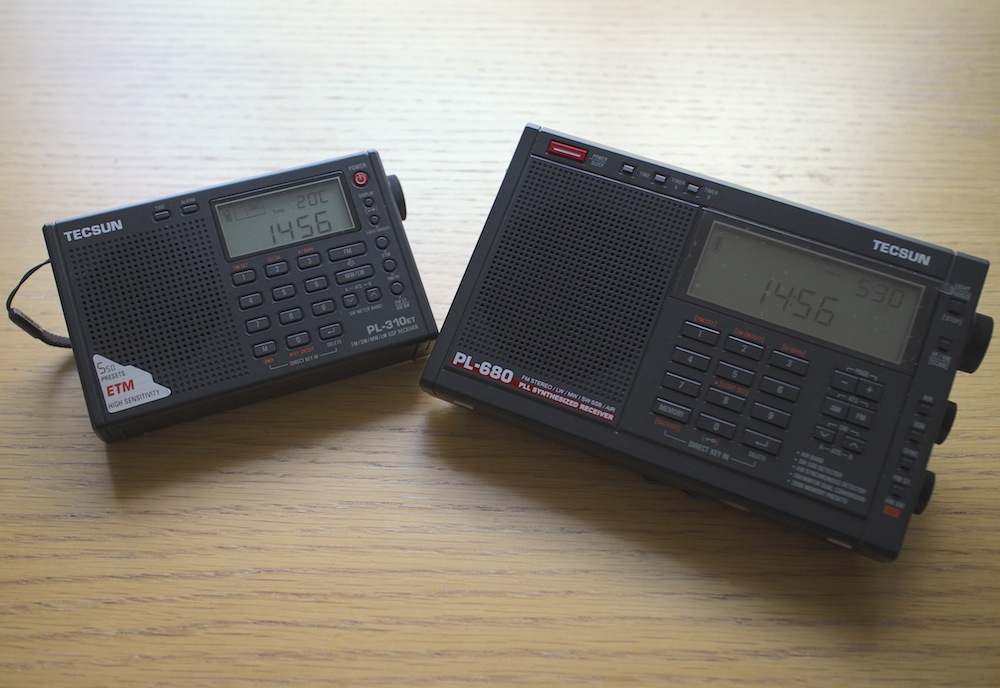
So how does one go about choosing a good radio? SWLing.com and eHam.net have fantastic radio review sections, which will help you choose a robust receiver that has withstood the test of time. My personal favourites in the portable category are Tecsun PL310-ET and Tecsun PL680. If you want a desktop radio, investigate the type of power supply it needs and find out whether you can get one that generates a minimal amount of noise.
It is also worth noting that indoor shortwave reception is usually best near windows with at least a partial view of the sky.
![]() |
| Tecsun PL310-ET and Tecsun PL680, my two favourite portable shortwave radios. |
Identify and switch off noisy appliances
Many indoor electrical appliances generate significant RFI on the shortwave bands. Examples include:
- Plasma televisions
- Laptop, and other switching-type power supplies
- Mobile phone chargers
- Dimmer switches
- Washing machines / dishwashers
- Amplified television antennas
- Halogen lighting
- LED lighting
- Badly constructed electrical heaters
- Mains extension leads with LED lights
Identify as many of these as you can and switch them all off. Then turn them back on one by one and monitor the noise situation with your shortwave radio. You will most likely find at least a few offending devices within your home.
Install an outdoor antenna
If you have searched your home for everything you can possibly turn off to make reception less noisy but aren't satisfied with the results, you might want to look into installing and outdoor antenna. That will be particularly effective if you live in a detached or a semi-detached property and have a garden of some sort. Of course, you will need a radio that has an external antenna input, but as for the antenna itself, a simple copper wire of several metres will do. An important trick is making sure that the noise from inside your home doesn't travel along your antenna, thus negating the advantage of having the latter installed outside. There are many ways of achieving this, but I will suggest a configuration that has worked well for me in the past.
![]() |
| Fig.1 Schematic for an outdoor dipole antenna. |
I have used a three-terminal balun (positioned outdoors), and connected two 6 metre copper wires to its antenna terminals to create a dipole. I then connected the balun to the radio indoors through the feed line terminal using a 50Ω coaxial cable. In the most general terms, the current that is generated in the antenna wires by the radio waves flows from one end of the dipole into the other, and a portion of this current flows down the feed line into your radio. The balun I have used (Wellbrook UMB130) is engineered in a way that prevents the radio noise current from inside your house flowing into the receiving part of the antenna.
![]() |
| Wellbrook UMB130 balun with the feed line terminal disconnected |
Antenna preselectors
There is a catch with using an outdoor antenna described above — the signals coming into your radio will be a lot stronger than what would be picked up by the radio's built-in "whip" antenna. This can overload the receiver and you will then hear many signals from different parts of the shortwave spectrum "mixing in" with the station you are trying to listen to. An antenna preselector solves this problem by allowing signals from a small yet adjustable part of the spectrum to reach your radio, while blocking the others. You can think of it as an additional tuner that helps your radio reject unwanted frequencies.
![]() |
| Fig.2 Schematic of a preselector inserted between the outdoor antenna and the receiver |
There are many antenna preselectors available on the market but I can particularly recommend Global AT-2000. Although no longer manufactured, many used units can be found on eBay.
![]() |
| Global AT-2000 antenna coupler and preselector |
Risk of lightning
Any outdoor antenna presents the risk of a lightning strike reaching inside your home with devastating and potentially lethal consequences. Always disconnect the antenna from the receiver and leave the feed line cable outside when not listening to the radio or when there is a chance of a thunderstorm in your area.
Get a magnetic loop antenna
![]() |
| A broadband loop antenna (image courtesy of wellbrook.uk.com) |
The outdoor long wire antenna worked well for me when I stayed at a suburban property with access to the garden, but when I moved into an apartment well above the ground floor and without a balcony, I realised that I needed a different solution. Having googled around I found several amateur radio websites talking about the indoor use of magnetic loop receive-only active antennas (in this case, "active" means that the antenna requires an input voltage to work). The claim was that such antennas respond "primarily to the magnetic field and reject locally radiated electric field noise"[*] resulting in lower noise reception than other compact antenna designs suitable for indoor use.
Interlude: signal to noise ratio
In radio reception, the important thing is not the signal strength by itself but the signal to noise ratio, or SNR. A larger antenna (such as a longer copper wire) will pick up more of the desired signal but, if close to RFI sources, will also pick up disproportionately more of the local noise. This will reduce the SNR and make the overall signal reading poorer, which is why it is not advisable to use large antennas indoors.
The other advantage of a loop antenna is that it is directional. By rotating the loop about its vertical axis one can maximise the reception strength of one particular signal over the others, once the antenna is aligned with the direction from which the signal is coming (this is termed "peaking" the signal). Similarly, it is possible to reduce the strength of a particular local noise source, since the loop is minimally sensitive to a given signal once it is perpendicular the latter's direction (also known as "nulling" the signal).
It is further possible to lower the effect of local noise sources by moving the antenna around. Because of the antenna's design, the effect of radio signals is mostly confined to the loop itself as opposed to its feed line. Most local noise sources have irregular radiation patterns indoors, meaning that it is possible find a spot inside your property where their effects are minimised.
Many compact shortwave loop antennas require an additional tuning unit to be attached to the loop base (much like the preselector described above) but broadband loops do not. Wellbrook ALA1530S+ is one such antenna that is only 1m in diameter, and it was the one I chose for my current apartment. I was rather impressed with its performance, although I found that I need to use a preselector with it as the loop occasionally overloads some of my receivers when used on its own. Below is a demo video comparing using my Tecsun PL680's built-in antenna to using the radio with the Wellbrook loop.
As you can hear, there is a significant improvement in the signal's readability when the loop is used.
Experiment with a phaser
Although the loop antenna dramatically reduces the levels of ambient RFI getting into the radio, I also have one particular local noise source which is way too strong for the loop's nulling capability. Ethernet Over Powerlines (PLT) transmits data across domestic electrical circuits using wall socket adapters, as an alternative to wireless networking. It uses the same frequencies as shortwave, which turns the circuits into powerful transmitting antennas, causing massive interference. One of my neighbours has PLT adapters installed at his property, which intermittently become active and transmit data. When this happens, it is not merely noise that is generated, but a very intense data signal that spreads across the entire shortwave spectrum, obliterating everything but the strongest stations underneath. Fortunately, a mature piece of radio technology called antenna phasing is available to deal with this problem.
![]() |
| Fig.3 The principle of antenna phaser operation (adapted from an original illustration in Timewave ANC-4's manual) |
Signal cancellation using phase difference
A phaser unit has two separate antenna inputs and provides one output to be connected to the radio's external antenna input. The theory of phase-based signal cancellation goes roughly as follows:
- The same radio signal will arrive at two different, locally separated antennas at essentially the same time.
- The phase of the signal received at the first antenna will be different to the phase of the same signal received at the second antenna.
- This phase difference depends on the direction from which the signal is coming, relative to the two antennas.
- The phaser unit can shift the phases of all signals received at one antenna by the same variable amount.
- To get rid of a particular (noise) signal using the phaser unit:
- the signal's phase at the first antenna has to be shifted by 180° relative to the signal's phase at the second antenna (thus producing a "mirror image" of the signal received at the second antenna)
- its amplitude at the first antenna has to be adjusted so that it is the same as the signal's amplitude at the second antenna
- the currents from the two antennas are then combined by the unit, and the signal and its mirror image cancel each other out at the unit's output, while the other signals are preserved.
Noise sampling antenna considerations
To prevent the possibility of the desired signal being cancelled out together with the noise signal — which can happen if they both come from the same direction relative to the antennas — one can use the set-up illustrated in Figure 3, where one antenna is dedicated to picking up the specific noise signal, while the other is geared towards receiving the desired broadcast. That way, even if the phases of both the noise and the desired signals are offset by the same amount, their relative amplitude differences will not be the same, and thus removing the noise signal will not completely cancel out the desired signal (though it will reduce the latter's strength to some extent).
It is possible to use any antenna combination for phase-based noise signal cancellation. However, one has to be careful that, in the pursuit of removing a specific noise source, one does not introduce more ambient RFI into the radio system by using a poorly designed noise-sampling antenna. After all, the phaser can only cancel out one signal at a time and will pass through everything else picked up by both antennas. This is particularly relevant in urban settings.
For this reason, I chose my noise sampling antenna to also be a Wellbrook ALA1530S+. The additional advantages of this set-up are:
- It is possible to move both loops around to minimise the amount of ambient RFI.
- By utilising the loops' directionality property, one can rotate the noise sampling loop to maximise the strength of the noise signal relative to the desired signal picked up by the main antenna loop.
![]() |
| Two Wellbrook ALA1530S+ antennas combined through a phaser |
And now onto the phaser units themselves.
Phaser units
![]() |
| DX Engineering NCC-1 (image courtesy of dxengineering.com) |
I have experimented at length with two phaser units: the MFJ 1026 (manual) and DX Engineering NCC-1 (manual). Both solve the problem of the PLT noise very well, but the NCC-1 offers amplitude and phase tuning controls that are much more precise, making it a lot easier to identify the right parameter settings. Unfortunately this comes at a price, as the NCC-1 is a lot more expensive than the MFJ unit. As before, a preselector is needed between the phaser and the radio to prevent overloading.
Below is a demo of DX Engineering NCC-1 at work on my neighbour's PLT noise. I have chosen to use my SDR's waterfall display to illustrate the nefarious effect of this type of radio interference and to show how well the NCC-1 copes with the challenge.
Cost considerations
![]() |
| Fig.4 Final urban noise mitigation schematic |
It would be fair to say that my final urban noise mitigation set-up, shown in Figure 4, is quite expensive: the total cost of two Wellbrook antennas ($288.38 each), a DX Engineering phaser ($599.95) and a Global AT2000 preselector ($80) comes to $1257. That seems like an astronomical price to pay for enjoying shortwave radio in the inner city! However, at this point another old saying comes to mind, "your radio is only as good as your antenna". There are many high-end shortwave receivers that cost at least this much (e.g. AOR AR7030), but on their own they won't be of any use in such a noisy environment. Meanwhile, technological progress has brought about many much cheaper radios that rival the older benchmark rigs in terms of performance, with Software Defined Radios (SDRs) being a particularly good example. It seems fair, then, to invest these cost savings into what makes shortwave listening possible. You may also find that your RFI situation is not as dire as mine and you only need some of the above equipment to solve your noise problems.
Filter audio with DSP
If you have implemented the above noise reduction steps but would still like a less noisy listening experience, consider using a Digital Signal Processing (DSP) solution. There are a number of different approaches and products available on the market, and I shall be reviewing some of them in my next post. Meanwhile, below are two demo videos of using DSP while listening to shortwave. The first clip shows the BHI Compact In-Line Noise Elimination Module at work together with a vintage shortwave receiver (Lowe HF-150). The second video compares using a Tecsun PL-660 portable radio indoors on its own and using the entire RFI mitigation set-up shown in Figure 4 together with a DSP noise reduction feature available in the SDR# software package, while using it with a FunCube Dongle Pro+ SDR. As a side note, it is worth remembering that while DSP approaches can make your listening experience more pleasant, they can't recover what has been lost due to interfering signals or inadequate antenna design.
Set up a wireless audio relay from your radio shack
The above RFI mitigation techniques can result in a rather clunky set-up that is not particularly portable, confining the listener to a specific location within their home. One way to get around this is by creating a wireless audio relay from your radio shack to the other parts of your house. I did this by combining the Nikkai AV sender/receiver pair and the TaoTronics BA01 portable Bluetooth transmitter:
Head for the outdoors!
So you have tried all of the above and none of it helps? As a last resort (for some, but personally I prefer it!), you can go outside to your nearest park with your portable radio. After all, if shortwave listening is causing you more frustration than joy it's hardly worth it. On the other hand, you might be surprised by what you'll be able to hear with a good receiver in a noise-free zone.
| Received on 14/03/2014 15:59 GMT in London, UK with Tecsun PL-660 + 6m wire antenna, outdoors (synchronous AM detector, lower side band, narrow bandwidth) |
Acknowledgements
Many of the above tricks and techniques were taught to me by my Twitter contacts. I am particularly grateful to @marcabbiss, @SWLingDotCom, @K7al_L3afta and @sdrsharp for their advice and assistance over the years.
Update (15/11/16): this article describes an older version of my portable SDR configuration. Jump to this post to see my current set-up.
As my friend Thomas Witherspoon frequently points out in his excellent blog, one of the great things about using a software defined radio package like SDR# is that one can record entire regions of the frequency space instead of a single station. Although I've always wanted to try this out, my home is plagued by tremendous electromagnetic interference and the challenge has always been finding the optimal equipment settings for a single station. Under such circumstances, capturing parts of the spectrum didn't really make sense. Now that I finally have a convenient portable SDR solution, I decided to give spectrum recording a go.
On the evening of 15/04/2015 I went out to a nearby park and set up my equipment as follows:
![]() |
| I used a thin SMA to BNC wire to reduce the strain on FunCube's RF front end connector. |
![]() |
| Hiding the gadgets from prying eyes inside the carrier bag (all listening done via a pair Bluetooth headphones) |
![]() |
| The feed line cable has a velcro strap which is great for attaching the former to a tree branch. |
![]() |
| 12m of wire were wrapped around the tree branches (two 6m wires connected to the balun in a dipole fashion) |
I fired up SDR#, set the centre frequency to 12095 kHz and started recording the spectrum to disk. This is what it looked like:
![]() |
| FunCube Dongle Pro+ spectrum circa 1600 UTC on 15/4/2015 (click above to enlarge) |
The frequency window of the captured spectrum was 192 kHz, which is the maximum that the FunCube Dongle Pro+ can provide. While this is only a small fraction of the entire shortwave spectrum, it it is still possible to simultaneously capture a fairly large number of radio signals within it. When I got home I replayed the spectrum data through SDR# several times to extract the following station recordings:
Voice of America (Somali service), 12055 kHz, 1600 UTC. The strongest signal in the above screenshot (unsurprising, as it happens to be transmitted from the closest geographical location). The SDR# / FunCube Dongle Pro+ combo did well not to produce audio artefacts given that the carrier peak occasionally inched close to 0db.
Radio Australia, 12065 kHz, 1559 UTC. SDR#'s passband tuning and synchronous detection were of invaluable help here because of VOA's blowtorch beam was destroying the lower sideband of Radio Australia's signal. A cheap portable radio almost certainly wouldn't cope in these circumstances!
NHK Radio, 12045 kHz, 1559 UTC. SDR# did a brilliant job of pulling this exceptionally weak station out from the static. However, once the nearby VOA powerhouse got going on 12055 kHz at 1600 UTC, it buried this signal almost completely, which you can hear towards the end of this short recording.
Voice of Korea, 12015 kHz, 1602 UTC. North Korea's international radio service in German. SDR# allows the user to select arbitrary audio filter widths, which was useful for this signal as its bandwidth was roughly 20kHz, making the sound come out in somewhat higher fidelity.
Radio Free Asia, 12075 kHz, 1600 UTC. Broadcasting from Tinian Island in the Pacific Ocean, the station comes through remarkably well. That is, until the Chinese start jamming it, which can be heard in the later part of the recording.
BBC World Service, 12095 kHz, 1559 UTC. BBC's signal is surprisingly crisp considering it is coming all the way from Madagascar.
Radio Farda, 12005 kHz, 1559 UTC broadcasting from Udon Thani in Thailand.
Radio Dialog, 12115 kHz, 1602 UTC broadcasting from Talata-Volondry in Madagascar (presumably airing the recording of their earlier Sunday morning program).
IBRA Radio, 12125 kHz, 1600 UTC broadcasting from Yerevan in Armenia.
Trans World Radio, 12160 kHz, 1602 UTC broadcasting from Tashkent in Uzbekistan.
All in all, I am really pleased with what I could pick up. If you have SDR# installed you can be the judge by downloading the spectrum recording itself. Unzip the file, select it after choosing "IQ file" as the input source in the application, and press play (make sure you tick "Swap IQ" and "Correct IQ" in radio options).
Update (15/11/16): this article describes my old portable SDR configuration. Jump to this post to see my current set-up.
This is a quick entry describing an update to my portable SDR setup. Readers may remember that my previous configuration suffered from the tablet's radio interference leaking into the FunCube Dongle Pro+ SDR. I solved the problem by using a galvanic USB isolator and a separate portable USB power supply for the dongle. When I posted this configuration on SWLing.com in August, Alexander DL4NO advised me that it's possible to get rid of the USB isolator. Because my balun has two terminals, he said, I can use it to make a dipole antenna (an antenna with two wires) that balances the radio current before it gets passed down into the SDR dongle, which ought to prevent tablet interference from getting into the antenna system.
At the time I wasn't sure this would work. His other suggestion — using a ferrite ring choke on the antenna feedline cable — didn't do much to suppress the tablet noise, which made me assume that it was FunCube Dongle's design that was at fault, and that the noise was getting in from the USB end and not via the antenna.
![]() |
| Wellbrook UMB130 balun |
However, when I finally tried out Alexander's suggestion, I could not believe what a drastic effect the addition of the second wire has: as soon as I connect it to the balun, the noise disappears, even with the USB isolator "out of the loop". This simplifies my portable SDR configuration substantially. Below is a demo video:
There is no sound here because I was listening to Radio Australia's 12065 kHz signal using a pair of Bluetooth headphones. Note the low noise floor and the absence of any interference on the spectrum. This has a substantial impact on the overall cost:
1) On The Go USB host cable for Toshiba's micro USB connector: $7
2) FunCube Dongle Pro+: $186
3) Wellbrook HF Balun: $60
4) Feedline cables $7
5) 12 metres of thick copper antenna wire: $16
The total without the tablet comes to $276, and if you buy an HP Stream 7, you only need to add $90 more. A complete on-the-go SDR solution for $366 doesn't sound too bad, does it? Many thanks to DL4NO for making my set-up that much more portable!
Update (15/11/16): this article describes an older version of my portable SDR configuration. Jump to this post to see my current set-up.
A few days ago The SWLing Post published a challenge to their readers: given a budget of $1200, to put together the best possible shortwave radio listening set-up that can function completely off the grid in the Himalayas.
My solution is to fuse my two previous submissions to The Post - my response to the shortwave listening challenge for the remote Atlantic island of Tristan Da Cunha and my portable SDR design - and to add solar power.
![]() |
| FunCube Dongle Pro+ and Toshiba Encore 8" running SDR# in a London park |
To recap, the tablet-based SDR set-up costs $643. My experiments with FunCube Dongle Pro+ and SDR# software have convinced me that this combination makes for one of the best shortwave listening experiences in its price range. Here are a few reasons why:
- SDR# has an excellent noise reduction algorithm that often turns laborious DXing into comfortable listening. It also has a robust synchronous detector, which, combined with its passband tuning and noise reduction algorithms can unbury almost any station from the surrounding co-channel interference.
However, given the remoteness of the location and the fact that there is no reliable electricity grid to speak of, we need a few extras:
Solar Power
You may recall that in my portable SDR solution there are two sets of batteries that need to be recharged:
- Toshiba's built in Lithium Ion battery (via its USB port)
- 4xAA batteries for the Gomadic 5V Power Pack (used for supplying extra power to the SDR)
First, let's get a compact, foldable solar panel:
![]() |
| 1. Powerfilm F16-1200 20W foldable solar panel |
I would go with Powerfilm F16-1200 20W foldable solar panel (buy it here for $210.99). Disclaimer: although I've never used any of the PowerFilm products or accessories, I have read good reviews of them from other radio enthusiasts. When folded, this solar panel measures merely 27.9cm x 16.5 cm - slightly smaller than an A4 notepad. Once fully opened, however, it can deliver 20W of power (15.4V, 1.2A), enough to charge the Toshiba tablet and 4xAA rechargeable batteries simultaneously.
To charge the AA cells, I would go with the Powerfilm RA-3b - 12V Battery Charger Pack for AA and AAA (buy here for $54.41) and the Powerfilm RA-2 12V Female Power Port Adapter (already included with F16-1200).
![]() |
| 2. RA-3b - 12V Battery Charger Pack for AA and AAA |
![]() |
| 3. RA-2 12V Female Power Port Adapter |
Although we only need 4 AA batteries for the Gomadic USB Power Pack, it's always nice to have some spare ones, just in case. I would throw in a pack of 12 Panasonic Eneloop AA 2100 Cycle Ni-MH Pre-Charged Rechargeable Batteries for $26.95.
![]() |
| 4. 12 Panasonic Eneloop Rechargeable Batteries |
The spares can be used in the following ways:
- To power the backup portable shortwave radio
- To have another batch ready when the batteries insde the Gomadic USB Power Pack run out.
- Using Gomadic, to charge the tablet outside daylight hours, for more daytime listening.
Now onto charging the tablet itself. For this I would use the Powertraveller Spidermonkey 4-Port USB Charger Hub at $38.76. Again, I haven't used this product, but according to the specifications it can charge up to 4 USB devices and accepts input power between 5V and 30V. The reviews are largely positive, so it seems like a safe choice.
![]() |
| 5. Powertraveller Spidermonkey 4-Port USB Charger Hub |
To connect the Spidermonkey hub to the solar panel we'll need the Powerfilm RA-16 - 3ft. Extension Adapter with 4.75mm Barrel cable (available here for $9.98)
![]() |
| 6. RA-16 - 3ft. Extension Adapter with 4.75mm Barrel |
If we want to charge both the tablet and the AA batteries simultaneously, the Powerfilm PP-7 - Multiple Device Charger Cable accessory will come in handy (here for $24.99)
![]() |
| 7. PP-7 - Multiple Device Charger Cable |
Antenna Extras
Living off the grid has the advantage of there being minimal man-made radio interference. For this reason we can use a larger antenna than in my original proposal. I suggest buying 40m of POLYS18 Copper-Clad Steel Antenna Wire from Universal Radio (the total comes to $31.44), cutting it halfway, and attaching each half to one of the two antenna terminals on the Wellbrook HF Balun, mentioned in my previous article, thus creating a dipole.
Of course, this makes for a rather powerful shortwave receiving antenna that can easily overload the radio. We can solve this problem by connecting the balun's feedline output to the antenna terminal on the Global AT-2000 Antenna Tuner, $85 via 25 feet of GadKo BNC Male Copper Stranded Center Conductor Cable , $16.90. We should then connect the radio terminal to the short feedline cable of the FunCube Dongle Pro+ SDR, with the ferrite chokes left in place. We will need 2 x BNC female to PL259 Adapters, $6.49, to connect the BNC cables to Global's PL259 female sockets.
![]() |
| 8. Global AT-2000 Antenna Tuner |
![]() |
| 9. 2 x BNC female to PL259 Adapters |
![]() |
| 10. GadKo BNC Male Copper Stranded Center Conductor Cable |
Finally, here's a simple schematic diagram of how the antenna parts should be wired together:
![]() |
| Connecting all the antenna bits together |
Backup Radio
The challenge article mentions that a back-up radio would be desirable in the event of other equipment failing. I suggest Tecsun PL-310 ET, available for $48.79 from Amazon. It's a very similar radio to the excellent Tecsun PL-380 (they use the same Silicon Labs chipset), but it has one notable advantage: an external antenna input! It takes a 3.5mm jack plug, so we'll need a BNC Socket to Composite 3.5mm Male Jack Plug Adapter, $2.01.
![]() |
| 11. Tecsun PL-310 ET |
![]() |
| 12. BNC Socket to Composite 3.5mm Male Jack Plug Adapter |
The subtotal for all of the above comes to $556.71. Adding on $643 for the tablet-based SDR solution brings the total to $1199.71, just 29 cents below the budget limit!
Update (15/11/16): this article describes my initial portable SDR configuration, which is now substantially improved. Jump to this post to see my current set-up.
This article is a follow up to the submission I made to the SWLing Post a little while ago. In short, the idea was to combine the FunCube Dongle Pro+ USB-based software defined radio (SDR) with an 8" Windows tablet running SDR# to have a portable, on-the-go SDR solution.
![]() |
| The original inspiration |
Tablet radio interference
At the outset, I thought that all that was necessary was a tablet (I chose Toshiba Encore 8"), the FunCube dongle itself and just some antenna wire. This turned out to be a naive assumption because the tablet's USB interface injected enormous amounts of radio frequency interference (RFI) into the SDR, making listening on some shortwave frequencies essentially impossible. Just to be sure that I wasn't being plagued by a defect of my chosen tablet model, I tried out the same set-up on a Dell Venue 8, with identical results.
To deal with the issue of tablet-generated RFI, I bought a galvanic USB isolator, which, in essence, is a box that breaks the electrical connection between the USB dongle and the tablet's USB interface while allowing USB data to pass through in both directions.
![]() |
| Heros Technology galvanic USB isolator |
Additional power for the SDR
Connections
The isolator resolved the RFI issue completely, but created another problem altogether: the device specifications state that the isolator's power output is restricted to 100mA at 5V. This is sufficient for USB devices that are self-powered but not for the FunCube dongle that draws all of its power from the USB port to which it is connected.
![]() |
| USB Y cable |
One way to supply extra power to a USB device is to use a "Y-cable". Such cables have one extra USB plug that can be attached to a source of additional power (for example, a USB power bank). This solution is commonly used to connect power-hungry items, such as large hard disks, to low-power, portable computing devices (laptops and tablets). Having bought this cable, my next step was to find/improvise a battery that meets the USB power specifications (5V, 500mA).
Yet more interference
My first thought was to use the mobile USB power bank that I use to charge my iPhone while on the go. After all, it already has a USB port and supplies power with the right voltage. Once again, my expectations were confounded and RFI reared its ugly head! The power bank radiates significant interference into the circuit because it uses a switching regulator to maintain steady voltage. Luckily, I came across Gomadic's portable AA battery pack with regulated 5V output that emits way less interference than any of the other USB batteries I tried (my intermediate solution used 4 rechargeable AA batteries and a makeshift USB connector, and although this resulted in zero additional interference I decided that it's not safe to supply the SDR with unregulated voltage that doesn't match the rest of the circuit). I used the handy passthrough USB voltmeter I bought in Maplin to check that Gomadic's nice-looking gadget does indeed give out 5V as advertised.
So, what can one do with the remaining RFI from the additional power supply? It turns out that it can be mitigated quite effectively by inserting a balun (item 10 on Figure 2) between the SDR and the antenna wire (item 12). The balun is connected to the SDR with a coaxial cable (the "feed line", item 11). Additionally, ferrite choke rings (item 9) attached to the feed line help reduce this RFI further: winding the feed line through the choke rings several times is sufficient. However, neither the balun nor the chokes are effective enough to replace the USB isolator! It appears they only help with the noise generated by the power supply, which is relatively minor anyway.
Cost vs Portability
When SWLing Post published the details of my intermediate solution, Dennis Walter - one of the engineers behind Bonito RadioJet - popped up in the comments section and suggested that my setup is too tedious, as it involves lots of cables, and that his SDR is superior in terms of portability and the supplied software. While I haven't had the chance to evaluate RadioJet, I pointed out that the cost of his radio is significantly higher than that of all of my components put together. I also mentioned that the free SDR# software I use is superb: it sounds excellent and offers a number of features that many software packages and conventional radios don't have. So, having finalised my design, I thought that it might be time to tally up the cost and listen to the results.
Below is the full component list:
11) Feedline cables $7
12) 6 metres of thick copper antenna wire: $8
Adding up the prices of items 2 - 12 (and excluding the optional voltmeter) brings the total cost to $449 vs. Bonito RadioJet's $689. For the price difference you can throw in the Toshiba tablet at $194 and still have some change, enough to buy a carrier bag and perhaps even a nice pair of headphones!
![]() |
| Figure 1. Radio components |
![]() |
| Figure 2. Antenna components |
In terms of portability, the entire setup fits nicely into an 11" laptop carrier bag.
![]() |
| Figure 3. Packing the components into an 11" carrier bag |
![]() |
| Figure 4. Ready to go |
Setting things up in the field is not particularly cumbersome, either:
![]() |
| Figure 5. Portable SDR setup in action in a local park |
As for the results, listen to the below snippets and be the judge. The only thing I will say is that none of my other portable radios have ever given me this kind of performance, not even with the long wire antenna attached:
At one point I wanted to build an enclosure to house the FunCube dongle, the power supply and the USB isolator in a single tidy unit, but I no longer see the need. It's easy to pack all of those items into the carrier bag and also they are all useful individually: the USB isolator can be paired with other SDRs, and I recently discovered a neat additional use for the Gomadic battery pack.
Well, that brings me to the end of this post. I hope my design will inspire you to come up with your own portable SDR system, and that you will share your results with me in the comments section. Happy listening!
Subscribe to:
Comments (Atom)


Follow / Subscribe