Shortwave radio listening is an exciting hobby, but for many of us city dwellers who either got back into it recently or tried it out for the first time not long ago, the first experience was a disappointing one: we could barely hear anything! Station signals, even the supposedly stronger ones, were buried in many different types of static and humming sounds. Why does this happen? The levels of urban radio frequency interference, or RFI, have increased dramatically in the last two decades and the proliferation of poorly engineered electronic gadgets is largely to blame. Plasma televisions, WiFi routers, badly designed switching power adapters and Ethernet Over Powerlines (also known as powerline network technology, or PLT) all severely pollute the shortwave part of the radio spectrum.
Does this mean we should give up trying to enjoy this fascinating medium and revert to using the TuneIn app on our smartphones? Certainly not! There are many angles from which we can attack this problem, and I shall outline a few of them below.
Get a good radio
The old adage "you get what you pay for" certainly holds true even when it comes to such "vintage" technologies as shortwave radio. Believe it or not, a poorly designed receiver can itself be the biggest source of noise on the bands. That is because many modern radios use embedded microprocessors and microcontrollers, which, if poorly installed, can generate interference. If the receiver comes with a badly designed power supply, that too can generate a lot of noise.
So how does one go about choosing a good radio?
SWLing.com and
eHam.net have fantastic radio review sections, which will help you choose a robust receiver that has withstood the test of time. My personal favourites in the portable category are Tecsun PL310-ET and Tecsun PL680. If you want a desktop radio, investigate the type of power supply it needs and find out whether you can get one that generates a minimal amount of noise.
It is also worth noting that indoor shortwave reception is usually best near windows with at least a partial view of the sky.
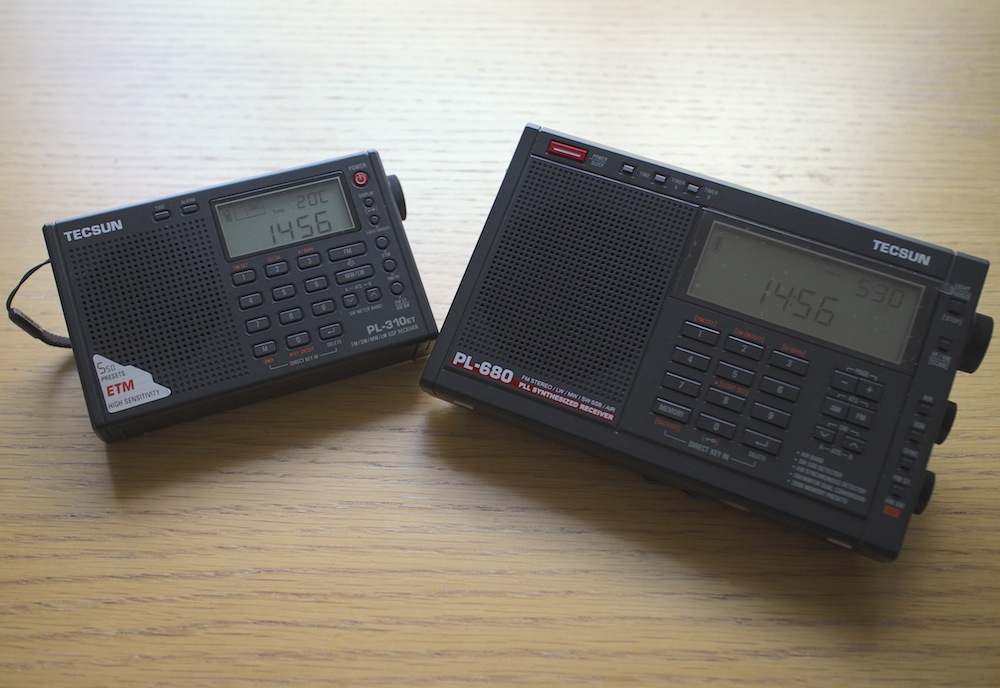 |
| Tecsun PL310-ET and Tecsun PL680, my two favourite portable shortwave radios. |
Identify and switch off noisy appliances
Many indoor electrical appliances generate significant RFI on the shortwave bands. Examples include:
- Plasma televisions
- Laptop, and other switching-type power supplies
- Mobile phone chargers
- Dimmer switches
- Washing machines / dishwashers
- Amplified television antennas
- Halogen lighting
- LED lighting
- Badly constructed electrical heaters
- Mains extension leads with LED lights
Identify as many of these as you can and switch them all off. Then turn them back on one by one and monitor the noise situation with your shortwave radio. You will most likely find at least a few offending devices within your home.
Install an outdoor antenna
If you have searched your home for everything you can possibly turn off to make reception less noisy but aren't satisfied with the results, you might want to look into installing and outdoor antenna. That will be particularly effective if you live in a detached or a semi-detached property and have a garden of some sort. Of course, you will need a radio that has an external antenna input, but as for the antenna itself, a simple copper wire of several metres will do. An important trick is making sure that the noise from inside your home doesn't travel along your antenna, thus negating the advantage of having the latter installed outside. There are many ways of achieving this, but I will suggest a configuration that has worked well for me in the past.
 |
| Fig.1 Schematic for an outdoor dipole antenna. |
I have used a three-terminal
balun (positioned outdoors), and connected two 6 metre copper wires to its antenna terminals to create a
dipole. I then connected the balun to the radio indoors through the feed line terminal using a 50Ω coaxial cable. In the most general terms, the current that is generated in the antenna wires by the radio waves flows from one end of the dipole into the other, and a portion of this current flows down the feed line into your radio. The balun I have used (
Wellbrook UMB130) is engineered in a way that prevents the radio noise current from inside your house flowing into the receiving part of the antenna.
 |
| Wellbrook UMB130 balun with the feed line terminal disconnected |
Antenna preselectors
There is a catch with using an outdoor antenna described above — the signals coming into your radio will be a lot stronger than what would be picked up by the radio's built-in "whip" antenna. This can overload the receiver and you will then hear many signals from different parts of the shortwave spectrum "mixing in" with the station you are trying to listen to. An
antenna preselector solves this problem by allowing signals from a small yet adjustable part of the spectrum to reach your radio, while blocking the others. You can think of it as an additional tuner that helps your radio reject unwanted frequencies.
 |
| Fig.2 Schematic of a preselector inserted between the outdoor antenna and the receiver |
There are many antenna preselectors available on the market but I can particularly recommend Global AT-2000. Although no longer manufactured, many used units can be found on eBay.
 |
| Global AT-2000 antenna coupler and preselector |
Risk of lightning
Any outdoor antenna presents the risk of a lightning strike reaching inside your home with devastating and potentially lethal consequences. Always disconnect the antenna from the receiver and leave the feed line cable outside when not listening to the radio or when there is a chance of a thunderstorm in your area.
Get a magnetic loop antenna
The outdoor long wire antenna worked well for me when I stayed at a suburban property with access to the garden, but when I moved into an apartment well above the ground floor and without a balcony, I realised that I needed a different solution. Having googled around I found several amateur radio websites talking about the indoor use of magnetic loop receive-only active antennas (in this case, "active" means that the antenna requires an input voltage to work). The claim was that such antennas respond "primarily to the magnetic field and reject locally radiated electric field noise"
[*] resulting in lower noise reception than other compact antenna designs suitable for indoor use.
Interlude: signal to noise ratio
In radio reception, the important thing is not the signal strength by itself but the signal to noise ratio, or SNR. A larger antenna (such as a longer copper wire) will pick up more of the desired signal but, if close to RFI sources, will also pick up disproportionately more of the local noise. This will reduce the SNR and make the overall signal reading poorer, which is why it is not advisable to use large antennas indoors.
The other advantage of a loop antenna is that it is directional. By rotating the loop about its vertical axis one can maximise the reception strength of one particular signal over the others, once the antenna is aligned with the direction from which the signal is coming (this is termed "peaking" the signal). Similarly, it is possible to reduce the strength of a particular local noise source, since the loop is minimally sensitive to a given signal once it is perpendicular the latter's direction (also known as "nulling" the signal).
It is further possible to lower the effect of local noise sources by moving the antenna around. Because of the antenna's design, the effect of radio signals is mostly confined to the loop itself as opposed to its feed line. Most local noise sources have irregular radiation patterns indoors, meaning that it is possible find a spot inside your property where their effects are minimised.
Many compact shortwave loop antennas require an additional tuning unit to be attached to the loop base (much like the preselector described above) but broadband loops do not.
Wellbrook ALA1530S+ is one such antenna that is only 1m in diameter, and it was the one I chose for my current apartment. I was rather impressed with its performance, although I found that I need to use a preselector with it as the loop occasionally overloads some of my receivers when used on its own. Below is a demo video comparing using my Tecsun PL680's built-in antenna to using the radio with the Wellbrook loop.
As you can hear, there is a significant improvement in the signal's readability when the loop is used.
Experiment with a phaser
Although the loop antenna dramatically reduces the levels of ambient RFI getting into the radio, I also have one particular local noise source which is way too strong for the loop's nulling capability. Ethernet Over Powerlines (PLT) transmits data across domestic electrical circuits using wall socket adapters, as an alternative to wireless networking. It uses the same frequencies as shortwave, which turns the circuits into powerful transmitting antennas, causing massive interference. One of my neighbours has PLT adapters installed at his property, which intermittently become active and transmit data. When this happens, it is not merely noise that is generated, but a very intense data signal that spreads across the entire shortwave spectrum, obliterating everything but the strongest stations underneath. Fortunately, a mature piece of radio technology called antenna phasing is available to deal with this problem.
Signal cancellation using phase difference
A phaser unit has two separate antenna inputs and provides one output to be connected to the radio's external antenna input. The theory of phase-based signal cancellation goes roughly as follows:
- The same radio signal will arrive at two different, locally separated antennas at essentially the same time.
- The phase of the signal received at the first antenna will be different to the phase of the same signal received at the second antenna.
- This phase difference depends on the direction from which the signal is coming, relative to the two antennas.
- The phaser unit can shift the phases of all signals received at one antenna by the same variable amount.
- To get rid of a particular (noise) signal using the phaser unit:
- the signal's phase at the first antenna has to be shifted by 180° relative to the signal's phase at the second antenna (thus producing a "mirror image" of the signal received at the second antenna)
- its amplitude at the first antenna has to be adjusted so that it is the same as the signal's amplitude at the second antenna
- the currents from the two antennas are then combined by the unit, and the signal and its mirror image cancel each other out at the unit's output, while the other signals are preserved.
Noise sampling antenna considerations
To prevent the possibility of the desired signal being cancelled out together with the noise signal — which can happen if they both come from the same direction relative to the antennas — one can use the set-up illustrated in Figure 3, where one antenna is dedicated to picking up the specific noise signal, while the other is geared towards receiving the desired broadcast. That way, even if the phases of both the noise and the desired signals are offset by the same amount, their relative amplitude differences will not be the same, and thus removing the noise signal will not completely cancel out the desired signal (though it will reduce the latter's strength to some extent).
It is possible to use any antenna combination for phase-based noise signal cancellation. However, one has to be careful that, in the pursuit of removing a specific noise source, one does not introduce more ambient RFI into the radio system by using a poorly designed noise-sampling antenna. After all, the phaser can only cancel out one signal at a time and will pass through everything else picked up by both antennas. This is particularly relevant in urban settings.
For this reason, I chose my noise sampling antenna to also be a Wellbrook ALA1530S+. The additional advantages of this set-up are:
- It is possible to move both loops around to minimise the amount of ambient RFI.
- By utilising the loops' directionality property, one can rotate the noise sampling loop to maximise the strength of the noise signal relative to the desired signal picked up by the main antenna loop.
 |
| Two Wellbrook ALA1530S+ antennas combined through a phaser |
And now onto the phaser units themselves.
Phaser units
I have experimented at length with two phaser units: the
MFJ 1026 (
manual) and
DX Engineering NCC-1 (
manual). Both solve the problem of the PLT noise very well, but the NCC-1 offers amplitude and phase tuning controls that are much more precise, making it a lot easier to identify the right parameter settings. Unfortunately this comes at a price, as the NCC-1 is a lot more expensive than the MFJ unit. As before, a preselector is needed between the phaser and the radio to prevent overloading.
Below is a demo of DX Engineering NCC-1 at work on my neighbour's PLT noise. I have chosen to use my SDR's waterfall display to illustrate the nefarious effect of this type of radio interference and to show how well the NCC-1 copes with the challenge.
Cost considerations
 |
| Fig.4 Final urban noise mitigation schematic |
It would be fair to say that my final urban noise mitigation set-up, shown in Figure 4, is quite expensive: the total cost of two Wellbrook antennas ($288.38 each), a DX Engineering phaser ($599.95) and a Global AT2000 preselector ($80) comes to $1257. That seems like an astronomical price to pay for enjoying shortwave radio in the inner city! However, at this point another old saying comes to mind, "your radio is only as good as your antenna". There are many high-end shortwave receivers that cost at least this much (e.g. AOR AR7030), but on their own they won't be of any use in such a noisy environment. Meanwhile, technological progress has brought about many much cheaper radios that rival the older benchmark rigs in terms of performance, with Software Defined Radios (SDRs) being a particularly good example. It seems fair, then, to invest these cost savings into what makes shortwave listening possible. You may also find that your RFI situation is not as dire as mine and you only need some of the above equipment to solve your noise problems.
Filter audio with DSP
If you have implemented the above noise reduction steps but would still like a less noisy listening experience, consider using a Digital Signal Processing (DSP) solution. There are a number of different approaches and products available on the market, and I shall be reviewing some of them in my next post. Meanwhile, below are two demo videos of using DSP while listening to shortwave. The first clip shows the
BHI Compact In-Line Noise Elimination Module at work together with a vintage shortwave receiver (Lowe HF-150). The second video compares using a Tecsun PL-660 portable radio indoors on its own and using the entire RFI mitigation set-up shown in Figure 4 together with a DSP noise reduction feature available in the SDR# software package, while using it with a FunCube Dongle Pro+ SDR. As a side note, it is worth remembering that while DSP approaches can make your listening experience more pleasant, they can't recover what has been lost due to interfering signals or inadequate antenna design.
Set up a wireless audio relay from your radio shack
The above RFI mitigation techniques can result in a rather clunky set-up that is not particularly portable, confining the listener to a specific location within their home. One way to get around this is by creating a wireless audio relay from your radio shack to the other parts of your house. I did this by combining the Nikkai AV sender/receiver pair and the
TaoTronics BA01 portable Bluetooth transmitter:
Head for the outdoors!
So you have tried all of the above and none of it helps? As a last resort (for some, but
personally I prefer it!), you can go outside to your nearest park with your portable radio. After all, if shortwave listening is causing you more frustration than joy it's hardly worth it. On the other hand, you might be surprised by what you'll be able to hear with a good receiver in a noise-free zone.
|
|
| Received on 14/03/2014 15:59 GMT in London, UK with Tecsun PL-660 + 6m wire antenna, outdoors (synchronous AM detector, lower side band, narrow bandwidth) |
Acknowledgements





Follow / Subscribe