This blog is dedicated to shortwave radio listening in the 21st century: the art of tuning into the signals of radio stations that are transmitting from thousands of kilometres away without the use of the Internet. It can be viewed as a fun hobby but also as a way to maintain an alternative, independent means of obtaining information in our digital age. Posts cover topics including shortwave radio equipment and accessories, station profiles, program recordings and shortwave radio history.
I recently purchased a Sony ICF-SW100 after reading multiple glowing reviews of it on eHam and the SWLing post. It's a great little shortwave radio that can easily fit into a jacket pocket. The unit has an external antenna input together with a DX/Local switch that adjusts the radio's sensitivity. However, after using the radio outdoors for several days I have found that the DX setting is just a little too sensitive when using it with the long wire antenna (resulting in distortion on some medium-strength signals), while the Local setting isn't very sensitive at all (meaning that some of these signals can only be heard very faintly).
It turns out that this problem can be solved by using a variable attenuator available in Maplin. The attenuator's specifications state that it has a 2dB — 20dB range and that it operates from 5MHz upwards. However, I have tested it with the ICF-SW100 as well as with my other radios, and I have found that it works very effectively all the way down to long wave. With some additional cable accessories, it's possible to insert the attenuator between ICF-SW100's external antenna input and the long wire as follows:
When I head out in the morning not knowing if I can get any free time later in the day to SWL outdoors, I take the following "opportunistic DXing kit" with me:
That's the Sony ICF-SW100, a Sony ICD-PX333 recorder, the Maplin variable attenuator with all the cable accessories, an audio volume attenuation cable (for connecting the recorder to the radio's line output), and the long wire antenna.
I am quite pleased with ICF-SW100's performance so far, and with this simple and cheap attenuator it's possible to get even more out of this radio in challenging reception conditions.
Capturing the shortwave spectrum out in the field.
Radio interference is a major problem in big cities when it comes to indoor shortwave reception. One effective solution I have found is to head for the local park and engage in scanning the bands there. However, since my time for making such outdoor trips is limited, I would always feel like I am missing out on a lot of radio action by monitoring a single frequency, which is all you can do with a standard shortwave radio. There are so many signals out there — which one should I go for? This inspired me to put together a lightweight, portable set-up that would let me capture large chunks of the shortwave radio spectrum out in the field, which I could later explore in detail. After two years of experimenting with various Software Defined Radio (SDR) technologies I am pleased to report that I finally have a solution that works well for this purpose.
A good SDR can give the user access to large portions of the radio spectrum via a graphical user interface. The user can then either process a specified part of it in realtime or record the chosen spectrum window in its entirety onto disk and analyse it later with the supplied software. Here is a short video showing the playback of one of such spectrum captures I made in a London park in September 2016. Note the final part where I zoom out to show the entire recorded frequency range (covering two broadcast bands with one ham band in the middle!):
When I got home from the park, I was able to replay that part of the spectrum capture many times over while scanning the frequency space, which is how I was able to identify a weak signal from a very distant ham radio operator that I might have otherwise missed.
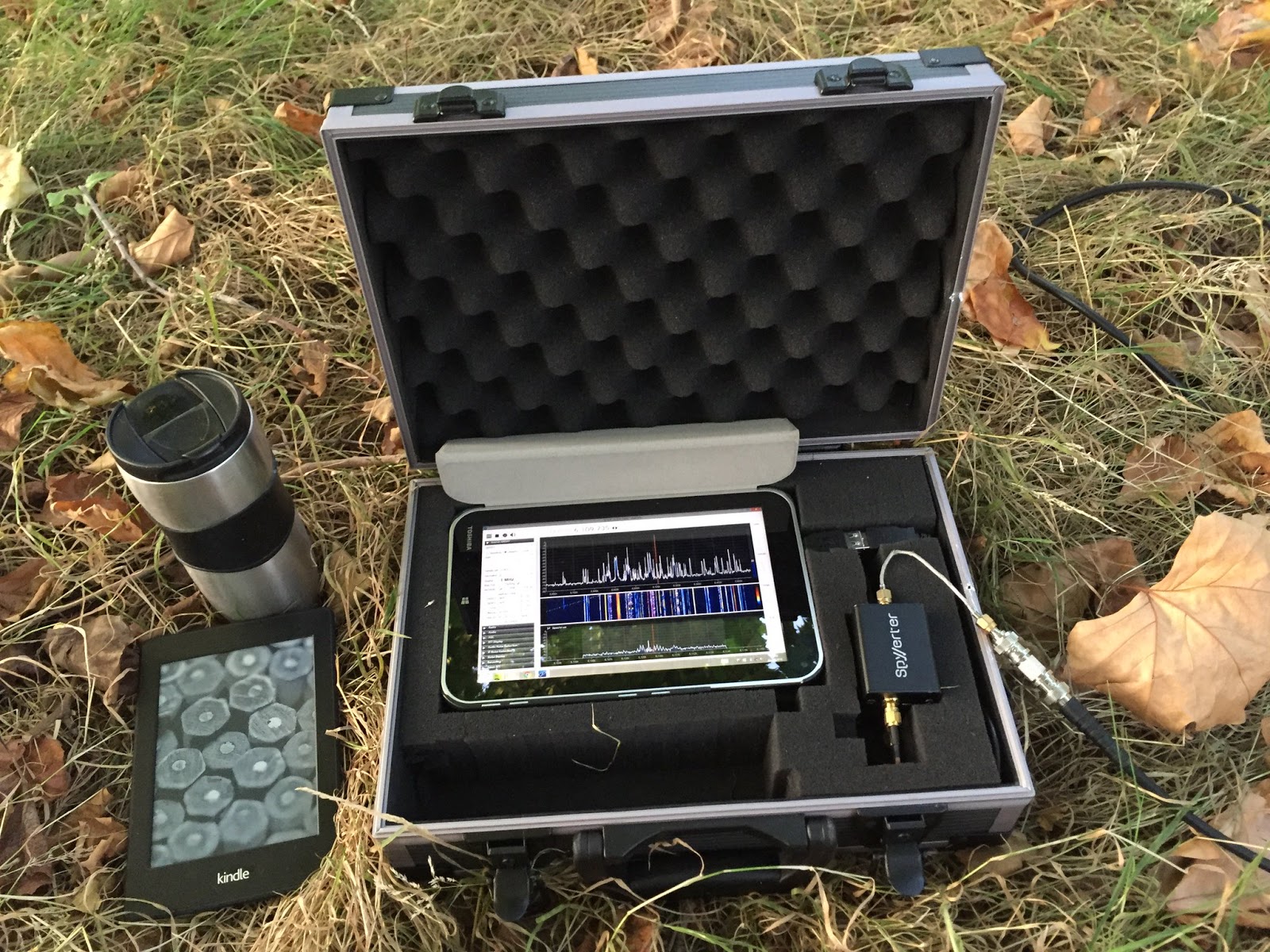
Below is the list of the components I have used to put together my "portable spectrum capture lab".
I bought this tablet in July 2014, based on the following criteria: the device had to have a reasonably powerful Intel processor, running the Windows 8 operating system. I believe that there are currently models on the market that are at least as powerful and are substantially cheaper (<$100).
Owing to its unique hardware design, the AirSpy SDR can monitor large parts of the radio spectrum (up to 10 MHz in bandwidth) while offering a high dynamic range and robustness to overloading, with almost no mixing/imaging products.
This additional device enables AirSpy to cover the shortwave bands (in fact, the entire frequency range between 0 khz and 30 MHz) and must be connected in-line between the AirSpy's front end and the antenna feed line, as follows:
Connection cables
Below is a small collection of cable accessories to connect the antenna to AirSpy/SpyVerter:
I use a three-terminal matched balun connected two 6 metre copper wires via its antenna terminals as a dipole antenna, and connect it to the SDR via the feed line terminal with the 3m BNC cable listed above. The balun (Wellbrook UMB130) is engineered in a way that prevents the radio noise current from the tablet (usually a significant source of interference) flowing into the receiving part of the antenna.
This foam-filled flight case comfortably houses all of the components. The parts 1 to 7 can remain assembled together, reducing the deployment time in the field.
I use this fast microSD card as the destination for my outdoor SDR recordings. The high transfer speed is critical - using slower microSD cards will result in large portions of the spectrum being dropped from the recordings. 64 Gigabytes can accommodate roughly one hour of spectrum data at 3 MHz bandwidth.
Windows tablets suffer from one major drawback: the touchscreen interface is usually inadequate for software that was designed for traditional computers with mice. A portable Bluetooth keyboard with a built-in trackpad solves this problem.
This small gadget turned out to be a very important part of the entire project. The Toshiba tablet has a rather unusual interference quirk that initially caused me hours of frustration. It turns out that significant amounts of radio noise are injected into the SDR when the tablet's external speakers are active. One way to fix this is to plug a pair of headphones into the tablet's line out jack, but this forces the listener to be glued to the device. The alternative is to pair the tablet with a Bluetooth audio receiving unit, such as the one listed above. It is worth noting that my other Windows tablet — a Dell Venue 8 — also suffers from this strange artefact.
Total cost: $610
Internal layout of the flight case
You'll see that I have stacked the SpyVerter enclosure on top of the AirSpy one. As the latter can get very hot, it is essential to leave a sufficiently large gap in the foam for ventilation. It's also worth leaving a small gap next to the tablet's power button to prevent Windows from accidentally going into standby mode.
Software configuration
The best software to use with the AirSpy/SpyVerter combination is SDR#. It offers an impressive collection of features that many software packages and conventional radios don't have, such as advanced noise reduction and synchronous detection with passband tuning. The following adjustments are required to make recording the spectrum a seamless experience:
Install the Baseband Recorder and File Player plugins
Baseband Recorder: this plugin enables efficient recording of very large spectrum (or "baseband") files. Download and decompress the plugin zip file. Copy the .dll files into the directory with the SDRSharp.exe executable. Open the MagicLine.txt file and copy the first line of text into Plugins.xml file, just before the "</sharpPlugins>" line.
File Player: this plugin enables the playback of recordings made with the Baseband Recorder plugin. Download and decompress the plugin zip file. Copy the .dll files into the directory with the SDRSharp.exe executable. Open the MagicLine.txt file and copy the first line of text into FrontEnds.xml file, just before the "</frontendPlugins>" line.
Configure Baseband Recorder
Open SDRSharp.exe and check that the program reports no errors when it loads.
Baseband Recorder configuration
In the plugin pane on the left, expand the Baseband Recorder tab and click "Configure". Change the File Format to WAV RF64 and make sure that the File length limit check box is not ticked. Click "Folder select" and choose the MicroSD card as the destination directory for the recordings.
Adjust AirSpy settings
Disclaimer: in this section I describe how I capture the maximum spectrum bandwidth that my tablet's CPU can handle. It involves operating SDR# in "debug mode" and exposes some internal functionality of AirSpy, which, if used incorrectly, can damage the radio. If you choose to copy my approach, please understand that you are doing so at your own risk and follow my instructions carefully to avoid voiding your AirSpy warranty.
Open SDRSharp.exe.Config file in Notepad. Look for "<add key="airspy.debug" value="0" />" line and change it to value="1".
Once the AirSpy and SpyVerter have been connected to the tablet, open SDR# and select AIRSPY in the Source tab. You will see the following configuration dialog.
AirSpy configuration
In the "Sample rate" field, type in "6 MSPS". For the "Decimation" option, choose "2". This setting will result in spectrum captures of 3 MHz bandwidth (although only 2.4 MHz of it will be shown on the waterfall display). To capture smaller chunks of the spectrum, increase the decimation value. Make sure the SpyVerter check box is ticked. Do not touch any of the fields or buttons under the "Address Value" line.
Make a short test recording
Press the play button in the top left corner and set the desired frequency.
In the Source tab, select the "Linearity" option. Keep increasing the Gain value by one position at a time until you notice that the radio signals suddenly become "saturated" (the waterfall display becomes full of artefacts and the signal you are listening to gets swamped with noise). Take the Gain value back down by two positions. This will ensure high sensitivity while preventing AirSpy from overloading.
In the Baseband Recorder tab, press "Record". While recording, do not change the radio frequency and do not move/drag the waterfall portion of the display. Stop the recording after a few minutes.
SDR# FilePlayer plugin
In the Source tab, change the input to "File Player" in the drop down menu. Click the Settings cogwheel button and select the spectrum recording file from the MicroSD card. A vertical band visualising the timeline of the spectrum capture will appear immediately to the right of the plugin pane. Click on the play button and select a radio signal to demodulate in the spectrum display. Listen to the audio carefully to make sure there are no dropouts or clicks: if so, your tablet and MicroSD card are capable of handing and storing the specified spectrum bandwidth.
Keep an eye on the gain
While making longer spectrum recordings, select a weak radio signal and keep monitoring its audio for signs of overloading. If the overloading does occur, reduce the Gain value further by one or two positions.
Some example spectrum captures
Shortwave for lunch. Playing back parts of the shortwave spectrum captured earlier in the park, inside a local cafe.
Below are some example videos in which I play back and explore the spectrum recordings I made during the trips to my local park.
Tropical and the 49m bands recorded outdoors on 03/07/16 at 0432 UTC. A good time of the day for listening to Latin America on shortwave.
In this post I include some of the more interesting things I have recently heard on shortwave using both my outdoor and indoor recording setups. Some of these recordings were made using standalone shortwave radios while the others were extracted from my SDR spectrum captures.
Very interesting vocal style heard on Ethiopia's Radio Fana. Recorded outdoors.
A British Airways flight bound for Antalya communicating with a ground control station over Stockholm Radio about a disturbance onboard. Recorded outdoors.
Over the past few days, I and many other shortwave listeners have noted that Radio Australia can no longer be heard on the air. Many of those who contacted the broadcaster received a cut-and-paste statement in response, saying that the outage is a result of technical maintenance. The wording is somewhat suspicious, however:
We are currently working with our transmission provider on a number of shut downs over the past week and again over the next week to investigate a range of technical and commercial issues for the service.
Thanks for the post. The Australian Government is about to hand down its 2016/17 budget tonight and has foreshadowed another round of cuts to the ABC. The new head of the ABC is an ex Google executive [...] so a nuanced response may not be forthcoming. These are dark days for Radio Australia and it may not survive another year.
The budget was passed shortly after the comment was left, but could Radio Australia be quietly testing the waters with ceasing shortwave broadcasts in advance of the next round of possible cuts?
The usual arguments about the economics of running a high-powered shortwave radio service are well known and have been discussed many times over. And time and again, what is missing from these discussions is the humanitarian aspect: depriving people in the less advantaged territories of the ability to receive global broadcasts at no cost results in a less equal world. A good friend of mine from India who went on to become a highly successful academic in the USA attributed his career path to regularly listening to the BBC World Service and Voice of America on shortwave while growing up in a poor neighbourhood. True, India is now much better connected than it was back then, but in how many other regions will shutting down shortwave radio result in lost opportunities for the people there to connect with the rest of the world? We wouldn’t dream of cutting Internet access in poor neighbourhoods in our own countries; shutting down all libraries in less privileged parts of our cities would result in an outcry. I find it hard to believe that this point is lost on the people charged with making such decisions and one can only hope that this is indeed a temporary outage.
Update (17/08/16) from Radio Australia's reception advice:
I thought I'd share a few of the catches I have made so far. First up, some good music. Here's an atmospheric set from the Voice of Greece on April 21st, 2016 at 2340 UTC:
A beautiful set of qawwalis and ragas from All India Radio Urdu service, recorded on May 23rd, 2016 at 0055 UTC. I especially like the song at 5 minutes 30 seconds into the recording:
I have also been fortunate to catch some more distant transmissions, such as Radio Thailand on 13/06/2016 at 1900 UTC:
A nice bonus that I didn't expect to show up in the spectrum recordings was the Voice of Turkey's English language broadcast on 04/06/2016 at 0300 UTC:
Finally, propagation from Cuba hasn't been great lately and I certainly have much clearer recordings of it from indoors than the one below, but the SDR# software did a fine job of pulling it out from the noise:
Overall, this has been a fun little project and given that I can make these recordings regularly (unlike the trips to my local park), there is a steady stream of gems to be extracted from the radio static and explored.
Archiving a small spectrum window on 31m indoors (Greece,India,Turkey,Romania,S.Arabia,Morocco). Good reception pic.twitter.com/l57h9prKda
I have been regularly recording the small spectrum window containing the endangered stations I mentioned in one of my previous posts. Three days ago I noticed something strange: a morse code transmission superimposed onto the Voice of Turkey's signal on 9460 kHz (video below):
Using SDR# I extracted the coded signal while suppressing the rest of the audio (recording embedded in the player below):
My Morse knowledge is patchy to say the least, so I decoded it using Fldigi. At the start of the recording, the sequence "8T1" is repeated a dozen of times. I Googled around and found another YouTube video of a Morse code transmission from a numbers station, reportedly codenamed M01, which also had multiple repetitions of "8T1".
Numbers stations are still sending messages from many different corners of the world. However, if I indeed captured an M01 transmission in this instance, what makes it unusual is that it was embedded inside a signal from a broadcast station and that it was strong enough to be heard clearly. I'll watch out for further occurrences of M01 on the airwaves.
Update: I received the following pointer from @priyom_org:
@LondonShortwave Not M01, but rather M14. Sends daily 1900 UTC on 9463 kHz and repeats 1930 UTC around 7353 kHz.
The shortwave music expedition continues with the fifth instalment of the playlist.
1. Palyrria - Ikariotikos(Dry Mix) Voice of Greece, May 2016
Born out of the need for experimentation PALYRRIA is a band that has devised and perfected its own, unique musical style. Created in 1999 Palyrria indulged in a mixture of western electronica and traditional music from around the Mediterranean. They call it world-electro and indeed this music is neither electronic nor ethnic. PALYRRIA has always been fascinated by traditional music and some of the bands members have worked with renowned traditional musicians, but living in Greece one realizes that traditional music goes way beyond the last millennium, back in times when people chose to express themselves in much more ecstatic and pagan ways. Ancient ceremonies around the Mediterranean have always been filled with music and musical expression. In a way, it wouldn't be too far from the truth if one was to draw a parallel between those events and the rave parties the world witnessed in the beginning of the nineties. The similarities are striking and have been the source of inspiration for the dynamic musical context of PALYRRIA. Aeolian scales, pentatonic music, instruments that come out of the depths of history, are presented alongside pumping bass lines, techno grooves, vocoders, clicks and cuts, in an attempt to create music that transcends the centuries and is both ancient and futuristic at the same time. Let the strangeness ware off and enjoy music that comes straight from the source.
(Discogs)
2. Berbang - Ezim Kurdistan Denge Kurdistane, September 2015
3. Adnane Chaouachi - Ya Ward Mfatah RTV Tunisia, December 2013
Adnène Chaouachi (عدنان الشواشي), born in Beja, is a musician, composer and Tunisian singer. (Wikipedia)
4. Mohammed Abdu - يالله إني في رجاك Medi 1, January 2016
Mohammed Abdu Othman Al-Aseeri, (Arabic: محمد عبده عثمان العسيري ) (born June 12, 1949) is well-known Saudi singer all across the Middle East. He had been described as "The Artist of Arabs". (Wikipedia)
5. Karan Khan - Inkar Kawi Na Sam Kawi Iqrar Sta Baanrha Radio Azadi, December 2015
Karan Khan is a renowned Pashto singer, broadcaster, music developer and PhD in Pashto. (Facebook)
This blog was started on a hot and sunny afternoon in July 2013, while enjoying listening to some distant signals with a Roberts R9962 shortwave radio.




Follow / Subscribe